Pages

Thursday, April 14, 2022

DIY 3.5" hard drive power supply for USB cable

 I got this USB interface from Aliexpress that allows you to connect any HDD/SSD to your USB ports.

Unfortunately 3.5" hard drives need external power in order to work. You can get this power from a ATX power supply or from a dedicated hard drive power supply that can be found online.

To keep my shit low cost I built my own power adapter with things I had around. I used:

- 12V 2A power supply. Got it from an old router.
- Mini 360 DCDC converter. Dead cheap from Aliexpress, so useful. Must have several at home.
- SATA or IDE power connector. Chopped from an old ATX power supply.

The build is so simple:

Worth noting:
- The Mini360 output voltage is adjustable with the potentiometer on top. You need to set it to around 5V with a multimeter.
- Wall adapters with lower output current than 2A will almost surely not work due to the required start up current of the HDD. (Tried with 1.5 A, didn't work).
- I used a piece of heat-shrink tubing to cover the mini360 and make it neat in the middle of the cable.

Let me know if you found it useful.


Friday, April 8, 2022

Olympus M.Zuiko Digital 14-42 mm II R vs EZ (pancake)

 If you doubt about what lens is better among the 14-42 II R and EZ, let me tell you what I found. This is a compilation of all the info that I found online. I'm no expert. This may save you some time.


The only advantage of the EZ is the small size, period. It seems it depends on your specific unit how well it performs. At best you can get the same results as with the IIR. At worst people seem to experience vignette and/or a little bit of lack of sharpness on the edges. It seems a mixed opinion. In any case, no one claimed to obtain better picture quality with the EZ. 

The electronic zoom on the EZ seems to be slow and significantly less easy to operate due to the electronic control. A noticeable amount of users reported issues with the electronics that required servicing the lens giving the impression that it's less robust than the manual IIR.

On the other hand, the IIR seems to be better at everything other than the size. Regarding this, the difference is only 25 mm in length more than the EZ which isn't a big deal. 

I think the IIR is the one to go. I reckon the only case in which the size can make a difference is if you wear a big jacket because you can fit the camera with the EZ and not with the IIR. However wearing any other clothes you're going to need a bag or something else anyway. Even if it fits your clothes, will you carry it like that?


Wednesday, June 30, 2021

Soehnle scale software tricks users

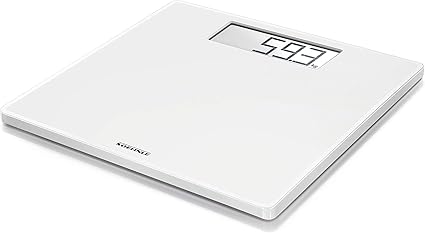
I own a Soehnle Style Sense Safe 100 scale and it feels like it's a quality product. Also, the German brand Soehnle is reputable to my knowledge.

Picture stolen from Amazon

The thing is, I recently discovered how the brand tricks the users into thinking the scale has perfect measurement exactitude. This is not difficult to notice because when using it to weight the same thing several times during a short period of time, it is strangely always spot on. So, based on my observations, I presume this is what the software does to trick the user:

1. When using it the first time, it stores the measurement of let's say 70 kg.
2. If it's used to weight the same thing several times in a short period of time, the measurement is performed as usual but just before displaying the final result, the previous stored value of 70 kg is recalled and showed, tricking the user into thinking, the scale measured the same.
3. If the scale detects that it is being used to weigh something that differs a certain amount (maybe 500 g more or less) than the last stored measurement, then it forgets that stored value and show the real measured one.
4. After some timeout that I didn't test (maybe 5 min, 1 hour, who knows...) the scale, as in point 3, forgets the value stored and performs a 'real' measurement again when it is used.

One can test the above by using it with a object A, then with an object B of different enough weight, and then back with A. In the last try, Object A will almost for sure show a drifted result, maybe by 100 g, 300 g or even 400 g. Now we are seeing here the truth.

That's all, I though it was interesting to share this. To a common user, this not only would be unnoticeable but also, will leave an impression of a wonderful product that always measures the same. However, not everyone can be tricked so easy. 

Sunday, June 14, 2020

Motorcycle cheap Aliexpress clock voltmeter thermometer

Hello, this time I want to rant about this cheap thing I bought for my motorcycle:

Picture stolen from an Aliexpress user

This is actually the second one I buy. The one I bought first cost me double and was a double piece of shit because it was so dim, I couldn't see shit while riding during the day.

The one I bough this time has the looks like the one in the picture, a fake Rizoma. It's funny because looking at the pictures of the users, it seems like each one gets one slightly different. The white letters, the size and the package differs from one user to another.

Anyway, I wanted to share some measurements I made to check how shitty these things are and this is what I found:
-  Voltage measurement: Resolution is 0.1 V. The measurement seems to be off by -0.1 V consistently across the hole range. 

Opinion: This maybe caused by some diode in series to protect against backwards connections. Considered how easy it is to achieve a proper 0.1 V resolution voltage measurement, this shit is totally unacceptable.  

- Temperature measurement: Resolution is 1 ºC. The measurement error differs but generally it's 1 to 2 degrees off the right value.

Opinion: The temperature is sensed with an NTC. Considered how easy it is to achieve a proper 1 degree resolution voltage measurement, again this is totally unacceptable.  

- Current consumption during operation: approx 30 mA.

Opinion: This really doesn't matter much, 30 mA is the typical power used by a multiplexed LED segment display plus some bits of circuitry more. Nothing new here.

- Current consumption during standby: approx 3.9 mA.

Opinion: This is absolutely huge power for standby. This can empty a full 6 Ah battery in a couple of months. This is not a surprise though... A regulator that can achieve standby consumption in the uA range is expensive, no way this was going to fit it.

Conclusion:
The specs of this cheap shit are completely out of the acceptable and the performance is pretty poor. This piece of crap belongs in the bin. 

However did I installed in the bike? Yes. 2 simple reasons:
- This cost under $4 while the original Koso Mini 3 is near $100 or in some places even more! Unfuckingbelievable! 
- There seems to be no better alternative that has the 3 features of this one for a reasonable price of let's say, maybe $15 or $20. So, I think I'll live with one this for now. 


Wednesday, May 13, 2020

Edifier S350DB high pitch noise defect

I bought these speakers for all the good opinions in the internet and it seems like there are many units with a manufacturing defect that involves a high pitch noise. Symptoms are:

- High pitch noise independent of speaker volume
- Only happens in Bluetooth, PC and AUX modes.
- Temperature dependent. As the unit warms up (after 10 min), the noise gets lower but never disappears. The colder the room, the worst.

I captured this picture with a spectrum analyser app:

You can see, it detected a peak around 4.4 kHz. This peak starts with higher frequency and amplitude when the unit is cold. As it warms up, it rolls down until maybe 1 or 2 kHz.


I investigated the problem. The sound amplification electronics are in the subwoofer box. It seemed like there was a problem with a switching power supply that steps down 20V from the main PSU to 5V for other parts of the circuitry. This noisy supply is controlled by a AOZ1210 IC. If one blows or apply heat to this IC, the noise frequency changes very noticeably.

I observed with an oscilloscope the supply output but no noise was being injected. This made me think, the noise wasn't being produced at the output but could be inductively coupled to other part of the PCB.

After this I decided to return the speakers, since, this was a manufacturer problem, not mine.

The replacement

The replacement speakers luckily worked fine. There was no noise at all.

As for the serial numbers, this new unit was manufactured actually before the defective one.

Defective unit SN: 441405044429
New unit SN: 441405042325

I try to visually inspect the PCBs of both units but couldn't notice any differences. The PCB revision was the exact same one, so no layout changes. The codes written in the AOZ1210 package were also the same ones.

The defective:

The new:


(The IC and the supply circuitry are located in the bottom right corner, next to the antenna).

The remote
Just as a remark, in my first unit the remote needed to be pointed exactly to the receiver in the speaker. It was very tricky but now I feel it's better. (BTW, the battery was more than OK).

Bottom line

I couldn't really tell what was the reason of the problem. but if you are in the same situation as I was, return them.

Tuesday, March 31, 2020

Drivers for CSR 4.0 Bluetooth dongle

Hello,

I bought this cheap dongle from Ebay because the built-in bluetooth device in my laptop is shit and produces high pitch distortion when connected to HiFi bluetooth speakers.


According to all Ebay sellers, this is plug and play but in that case you get the generic drivers from Microsoft. In my computer these drivers where such a piece of shit that the laptop couldn't even establish a connection with the speakers.

After lots of search, I found the proper proprietary drivers from Cambridge Silicon, which seems to be a shut company now.

Here there are for you. I got them running on Windows 8.1. Can't say for sure if this will run on Windows 10. Please, if someone tries, comment the result.

DOWNLOAD:
https://mega.nz/#!VccTjABB!s0qW3sLvLB30-ARn72Vmot5OdA3KjlXcmQDZ4G2IFEI

Cheers fuckers.

Saturday, February 16, 2019

Hacking a Crouzet PLC (Zelio, Schneider)


I was given a Crouzet PLC, which turned out to be the same as other more popular brands like Zelio. Some time ago I successfully built a cable with a TTL-USB converter. I got the instructions from these links:

http://plc-blog.com.ua/cable-zelio-sr2cbl01
http://www.hexperiments.com/?page_id=11

However after establishing a good connection with the PC I couldn't do anything with it. I come up with a solution in this post.

The problem
My PLC is a Crouzet CD12 model 88970823. For some stupid reason this PLC with this particular model number is a custom one, made (or locked) for one specific customer. I am completely convinced it's the exact same one as the readily available 88970042, however because of the difference in model number, the programming software (M3 soft) says it is unsupported and so, it don't allow me to do any damn thing to this piece of shit. So that was the problem.


Fail attempts
I thought of several approaches to solve this. Starting for the simpler, I tried to hack the M3 soft program itself at first but there was no file that I could easily edit to add my model to the supported list. Moreover, I couldn't easily disassemble the code.

The hack
The second easiest thing I came up with was to develop a simple man-in-the-middle program that controls the communications through the COM port, so when the time came I could fake the identity of my PLC and make the computer believe it's a supported device. To do this, first I used the free tool "null modem emulator (com0com)" that allowed me to create a virtual pair of COM ports so I can connect M3 soft to my program. Then, I wrote a Python script that did the work and talk directly to the PLC.

That was one cool and fun approach btw. The diagram is like this:


Sniffing the communication
I programmed a sniffer in Python to log the traffic of the COM port, which also was a a man-in-the-middle but for then, it was a transparent logger. The COM parameters as baudrate, data bits... where found in the internet. To be exact, in the following link, which is the datasheet of a compatible HMI for the Zelio (which is the same one under another brand).

Baudrate: 115200
Data bits: 7
Parity: even
Stop bits: 1

https://euroec.by/assets/files/weintek/plc_connection_guide/Schneider_Zelio.pdf


Playing with the M3 soft I could see how the traffic flowed.


Data from M3 soft at 14:30:49.385069 -> b':010300006D00018E\r\n'
Data from PLC at 14:30:49.433699 -> b':01030100FB\r\n'
Data from M3 soft at 14:30:49.455736 -> b':011000006C00020E0073\r\n'
Data from PLC at 14:30:49.493760 -> b':011000006C000281\r\n'
Data from M3 soft at 14:30:49.506650 -> b':0103000066004056\r\n'
Data from PLC at 14:30:49.558686 ->':010340434431325330373032302020383839373038
323301000208040401001D07000032343632303031353036303730373039313902000200010C000
20201020C03F2AD\r\n'
Data from M3 soft at 14:30:49.572890 -> b':0103000066404016\r\n'
Data from PLC at 14:30:49.617998 -> b':01034004D44700000000000020202020202020202020202
000000000000000000000000000000000000000000020202020202020202020202000000000000
0000000009D\r\n'
Data from M3 soft at 14:30:49.629034 -> b':01030000668040D6\r\n'
Data from PLC at 14:30:49.678148 -> b':010340000000000000000000000000000000000000000000
00000000000000000000000000000000000000000000000000000000000000000000000000000000000000BC\r\n'
Data from M3 soft at 14:30:49.689183 -> b':0103000066C004D2\r\n'
Data from PLC at 14:30:49.733299 -> b':01030400000000F8\r\n'
Data from M3 soft at 14:30:49.744307 -> b':011000006C00020F0072\r\n'
Data from PLC at 14:30:49.793846 -> b':011000006C000281\r\n'
Data from M3 soft at 14:30:49.804854 -> b':011000006C00020E0073\r\n'
Data from PLC at 14:30:49.853793 -> b':011000006C000281\r\n'
Data from M3 soft at 14:30:49.878726 -> b':0103000066004056\r\n'
Data from PLC at 14:30:49.917554 -> b':0103404344313253303730323020203838393730383233010002080
40401001D07000032343632303031353036303730373039313902000200010C00020201020C03F2AD\r\n'
Data from M3 soft at 14:30:49.939575 -> b':0103000066404016\r\n'
Data from PLC at 14:30:49.997619 -> b':01034004D4470000000000002020202020202020202020200000
00000000000000000000000000000000000000202020202020202020202020000000000000000000009D\r\n'
Data from M3 soft at 14:30:50.008626 -> b':01030000668040D6\r\n'
Data from PLC at 14:30:50.058750 -> b':01034000000000000000000000000000000000000000000000000000000
000000000000000000000000000000000000000000000000000000000000000000000000000BC\r\n'
Data from M3 soft at 14:30:50.070752 -> b':0103000066C004D2\r\n'
Data from PLC at 14:30:50.112383 -> b':01030400000000F8\r\n'
Data from M3 soft at 14:30:50.123392 -> b':011000006C00020F0072\r\n'
Data from PLC at 14:30:50.171425 -> b':011000006C000281\r\n'

The communication seemed to use the protocol Modbus Ascii, sort of. It used the same frame format but with custom instructions. To make sure I was right, I check if the checksum was calculated as expected with that protocol. The algorithm can be found in Wikipedia.

https://en.wikipedia.org/wiki/Modbus

The checksum calculation matched the one in the frames I was sniffing so everything looked good.

Analysing the data
Apart from the communication format, I could not see anything interesting, so I kept playing with the M3 soft. Things got exciting when I pressed the option "Controller Diagnostics" and received this message:


That meant that when I pressed that button, the PLC sent the model number to the PC anyhow. The log of my sniffer showed lots of data, it wasn't clear where the number was nor how it was encoded.

I discarded some frames that where duplicated and after messing around for some time I found the damn think. I discovered that the number was send in ascii hex, so the model 88970823 looked like 3838393730383233! Do you see it?


Data from PLC at 14:47:43.559812 -> b':01034043443132533037303230202038383937303832330100
0208040401001D07000032343632303031353036303730373039313902000200010C00020201020C03F2AD\r\n'


Faking the identity
That being so, I needed to inject the right model number in there, which was 88970042 or 3838393730303432 in hex. Also, I needed to regenerate the checksum once the data is modified so the M3 soft didn't complain (I tried it).

I modified my man-in-the-middle script to look for the request from the PC to send the PLC identity. Then it catches the frame from the PLC, injects the fake model number, regenerates the checksum and sends the info to the PC. The script doesn't messes with the rest of the data in the frame.

Beware this script needs module "pyserial" to run (not module "serial").

#Crouzet Hacker. Pedro Fernandez. Feb-2019

import serial, time
from datetime import datetime

#PARAMS--------------------------------------
#              port1    port2
portsAKAs = ["M3 soft", "PLC"]
enable_log = False

def log(data, source):
    if enable_log:
        timestamp = str(datetime.now())
        if data:
            print("Data from " + source + " at " + timestamp[11::] + " -> " + str(data), end='\n')

def modbusAsciiChecksum(frame):
    address = frame[1:3]
    function = frame[3:5]
    data = frame[5::]

    add = 0
    add += int(address, 16)
    add += int(function, 16)

    for i in range(0, len(data), 2):
        add += int(data[i:i+2], 16)

    add = -add
    add &= 0xFF
    result = str(hex(add).upper())
    return result[2::]

def generateInjection(frame):
    frame_decoded = frame.decode()      
    frame_decoded = frame_decoded.replace("3838393730383233", "3838393730303432") #replace 88970823 by 88970042

    #regenerate checksum
    frame_decoded = frame_decoded[0:-4] #crop old checksum and /r/n
    frame_decoded += modbusAsciiChecksum(frame_decoded)
    return bytes(frame_decoded, 'ascii') 


#MAIN-----------------------------------------
print("Crouzet Hacker. Pedro Fernandez. Feb-2019")
print("To stop press Ctrl + C.\n")

print("Enter M3 soft COM number: ", end='')
port1num = input()
print("Enter PLC COM number: ", end='')
port2num = input()

#Port inits
port1 = serial.Serial(port="COM" + str(port1num), baudrate=115200, bytesize=7, parity='E', stopbits=1)
port2 = serial.Serial(port="COM" + str(port2num), baudrate=115200, bytesize=7, parity='E', stopbits=1)

print("Waiting for data...")

IDrequested = False
try:
    while True:
        #M3 soft
        if port1.in_waiting > 0:
            time.sleep(0.01)
            data_from_1_to_2 = port1.readline()
            log(data_from_1_to_2, portsAKAs[0])
            port2.write(data_from_1_to_2)

            if data_from_1_to_2 == bytes(':0103000066004056\r\n', 'ascii'):
                IDrequested = True
                print("Identification requested by M3 soft")
        #PLC
        if port2.in_waiting > 0:
            time.sleep(0.01)
            data_from_2_to_1 = port2.readline()
            if IDrequested:
                data_from_2_to_1 = generateInjection(data_from_2_to_1)
                IDrequested = False
                print("Fake ID injected")
            log(data_from_2_to_1, portsAKAs[1])
            port1.write(data_from_2_to_1)

except KeyboardInterrupt:
    port1.close()
    port2.close()
    print("Ports closed.")
input()

Success
Fortunately, I got it to work flawlessly. I tried to read and write to the PLC without any problem. I even updated the PLC firmware (this didn't modified the model number though).


Tell me in the comments if it helped or whatever.

*Update for clarification

- COM ports configuration

If, for example, your physical USB-TTL adapter is COM1 and you have the following bridge in com0com:


Then, you'll need to set M3 Soft connection to COM4, then in the script set COM5 for M3 Soft and COM1 for PLC.